
 PREMIUM
Skin drops are live
Play with PREMIUM to earn CS2 skins: withdraw them to Steam or exchange them for wPLN.
Surf
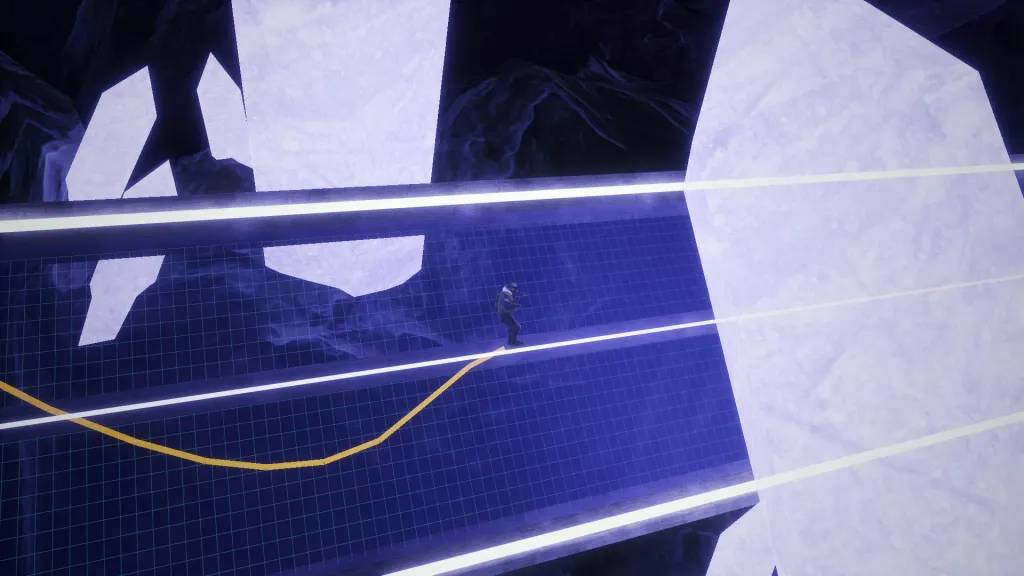
NewSurf is racing down ramps against the clock, with a leaderboard for every map and replays of the records.
- In game
- 1/23
- Server
- Online
- Map
- surf_elysium
Servers 1
- Play1/23Free: 22
Guide
How to play Surf
How this mode works, followed by every command available on Surf servers.
How the mode works
Leave the start zone
The timer starts by itself when you leave the start zone and stops at the finish. On a ramp hold A or D towards it and don't press W.
Fell off? Type !r
!r takes you back to the course start. Practise a hard part with !cp, which saves your position, and !tp, which goes back to it and stops the timer.
Beat records in !surf
In !surf you check the top and your times, watch the record replay and change the movement mode, e.g. 64t or 128t.
Commands on Surf servers
Type them in the in-game chat.
Gameplay
| What you want to do | Command |
|---|---|
| Open the top, times, replays and settings: !top, !pb and !replay open their own tab right away | !surf |
| Go back to the course start: Stops the timer, !ssp sets your own start spot | !ror !restart |
| Go to a bonus start: !b 2 is bonus 2, !rb restarts the current one | !b <n>or !rb |
| Go to a stage start: During a run !rs goes back to the current stage without stopping the time | !s <n>or !rs |
| Look at the course finish: A teleport with no time | !end |
| Check the best times and the record: Every mode and style has its own ranking | !topor !pb, !sr |
| Practice a hard section: !cp saves a position, !tp goes back and stops the timer | !cpor !tp |
| Switch between saved positions: !undo takes back the last teleport | !prevcpor !nextcp, !undo |
| Set your own start spot: Stand in the start zone, it is kept for this map | !sspor !csp |
| Change the movement mode: 64t, 85t, 102t, 128t or css | !modeor !64t, !css |
| Add a challenge: Low or high gravity and speed limits | !style |
| Teleport to a player: Not during a run | !goto <nick> |
| Fly through walls: Stops the timer | !noclip |
| Spectate a player or the record bot: !specs shows who is watching you | !specor !specs |
| Hide other players, your weapon or legs: Hidden players make no sounds either | !hideor !hideweapon, !hidelegs |
| Set your field of view: From 80 to 130 | !fov <n> |
| Toggle the panel, sounds and trail: All of it also in !surf, under Settings | !panelor !tss, !beam |
| Watch the record or save a moment: !rp is pause and seek, !rpsave saves your last seconds | !replayor !rp, !rpsave |
| Pick your trail colour and timer themePremium: In the Premium tab. Plus 10 !rpsave saves, !cp points kept after you leave, a ★ by your name and priority for the !replay bot | !surf |
Rank and missions
| What you want to do | Command |
|---|---|
| See your missions: Daily and weekly tasks with rewards · Missions on the website | !missionsor !misje |
Shop and looks
Coin shop
| What you want to do | Command |
|---|---|
| Open the shop: Hats, smoke colours, parachutes and tags for coins · Shop on the website | !shopor !sklep |
| Check your coins | !coinsor !monety |
| Sell items | !sell |
| Send coins to a player: 3% fee | !transfer <nick/steamid> <kwota>or !przelew |
| Change how earned coins show: Live or as a summary | !earnmode |
| Set your own name tag: Needs an item from the shop | !customtag <tekst> |
| Show or hide the PREMIUM tag | !premiumtag |
Premium
| What you want to do | Command |
|---|---|
| Buy or extend Premium: Also status and wPLN top-up · Premium on the website | !vipor !premium, !itemshop |
wPLN top-up
| What you want to do | Command |
|---|---|
| Top up wPLN with an SMS code: Type the code from the SMS | !kodsms <kod> |
Skins
| What you want to do | Command |
|---|---|
| Set your skins: Skins, stickers and presets · Skins on the website | !wsor !skins |
ASMR
| What you want to do | Command |
|---|---|
| Turn on mechanical keyboard sounds: Only you hear the clicks on W A S D, crouch and jump. Pick the switch and volume in the menu | !asmr |
Map and score
| What you want to do | Command |
|---|---|
| Vote to change the map | !rtv |
| Suggest a map for the vote | !nominate <mapa> |
| Check the time left on the map | !timeleft |
| Check the next map | !nextmap |
Help
| What you want to do | Command |
|---|---|
| Report a player: Cheating or toxic behaviour | !report |
| Message the admins online: In team chat, start the message with @ | @wiadomość |
| Check your chat or mic block: Reason, admin and time left | !comms |
| List the OneTap.pl servers: Printed in the console | !serversor !serwery |
| Show the command list in game | !helpor !pomoc, !komendy |
Open the chat with Y. A command starting with ! is seen by the whole server, one starting with / only by you. In game, !help shows this list.
Works on its own
Nothing to type.
- Skin dropsPremium: Playing with PREMIUM earns you real CS2 skins. Withdraw them to Steam or exchange them for wPLN.
- A slot on a full serverPremium: With PREMIUM you get in even when every slot is taken.
- Play time on your profile: Every minute on the server counts on your profile.
About the mode
CS2 Surf servers
Surf is racing down ramps against the clock, with a leaderboard for every map and replays of the records. The timer starts by itself when you leave the start zone, and a bot replays the best run on the map, so you can see the line the record holder takes.
The pool has more than 20 maps, from surf_beginner for newcomers to hard courses with stages and bonuses. !cp saves your position so you can practise a hard part, and !mode changes the movement physics (64, 85, 102 or 128 tick, or the CS:S style). PREMIUM adds a coloured trail behind you and themes for the timer.
Frequently Asked Questions
How do I start playing surf in CS2?
Join a server and leave the start zone, the timer starts by itself. On a ramp hold A or D towards it and don't press W. When you fall, !r takes you back to the course start.
Which commands work on Surf servers?
The key ones are !surf (open the top, times, replays and settings), !r (go back to the course start), !top (check the best times and the record), !cp (practice a hard section). Every command with a description is in the guide on this page, and !help shows them in game.
How do I join a Surf server?
Click “Connect” next to a server in the list above - Steam will launch CS2 and connect you straight away. You can also copy the IP and type connect followed by that address in the CS2 console.
Is playing on OneTap.pl servers free?
Yes, all servers are free - all you need is CS2 on Steam. VIP and PREMIUM ranks are optional and add extras such as more rank points and coins or a reserved slot.